功能说明
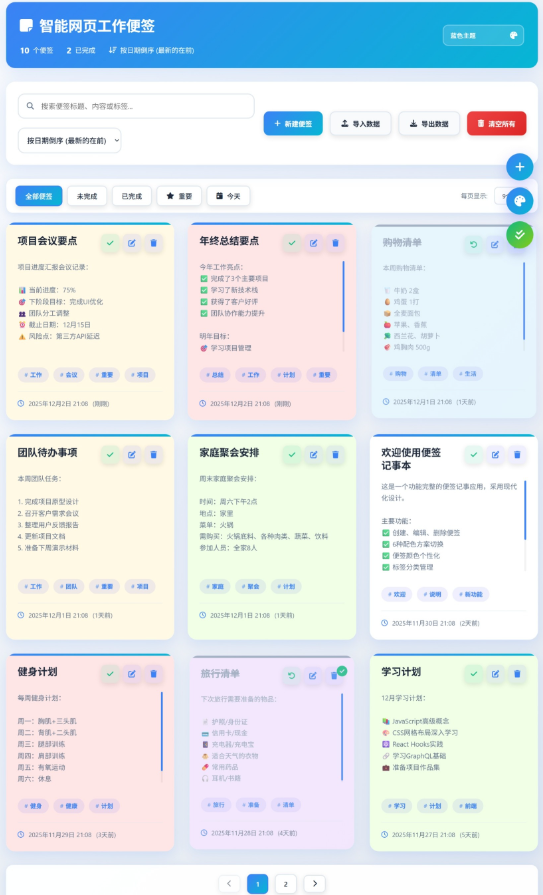
便笺显示:默认设置便签按创建日期倒序显示(最新的便签在最前面)
主题选择:支持消息通知(toast通知)
红色主题 – 激情、活力,适合需要强调重要事项的场景
青色主题 – 清新、科技感,适合程序员和技术工作者
琥珀色主题 – 温暖、明亮,适合创意工作者
靛蓝色主题 – 专业、深邃,适合商务用途
玫瑰色主题 – 温柔、浪漫,适合个人笔记
青绿色主题 – 时尚、潮流,年轻化设计
导入数据:粘贴json数据
导出数据:json数据格式
完成操作:作为工作任务时,可进行完成操作,或一键所有任务完成。
关键代码
// 加载保存的主题
function loadTheme() {
const savedTheme = localStorage.getItem(THEME_KEY);
if (savedTheme) {
currentTheme = savedTheme;
document.body.className = savedTheme;
document.getElementById(‘theme-select’).value = savedTheme;
}
}
// 切换主题
function switchTheme(theme) {
document.body.className = theme;
currentTheme = theme;
localStorage.setItem(THEME_KEY, theme);
document.getElementById(‘theme-select’).value = theme;
showToast(‘主题已切换!’);
}
…
// 从本地存储获取便签数据
function getNotesFromStorage() {
const notesJSON = localStorage.getItem(STORAGE_KEY);
const notes = notesJSON ? JSON.parse(notesJSON) : [];
// 确保每个便签都有completed属性
return notes.map(note => ({
…note,
completed: note.completed || false
}));
}
// 保存便签到本地存储
function saveNotesToStorage(notes) {
localStorage.setItem(STORAGE_KEY, JSON.stringify(notes));
}
 微信扫一扫
微信扫一扫  支付宝扫一扫